The CatCard is your official Hartnell College student identification card. Your physical CatCard provides access to campus services, student benefits, and eligible Monterey-Salinas Transit (MST) transportation.
Hartnell College issues physical CatCards only to currently enrolled students. Your first CatCard is free, and replacement cards cost $5. Students must also be current on their Student Activities Fee to receive a card.
How to Get Your CatCard
- Go to catcard.hartnell.edu to upload your photo.
- This is an official Hartnell College ID, NOT a social media picture. Your picture will be rejected until it meets the criteria stated below.
Tips for uploading your photo
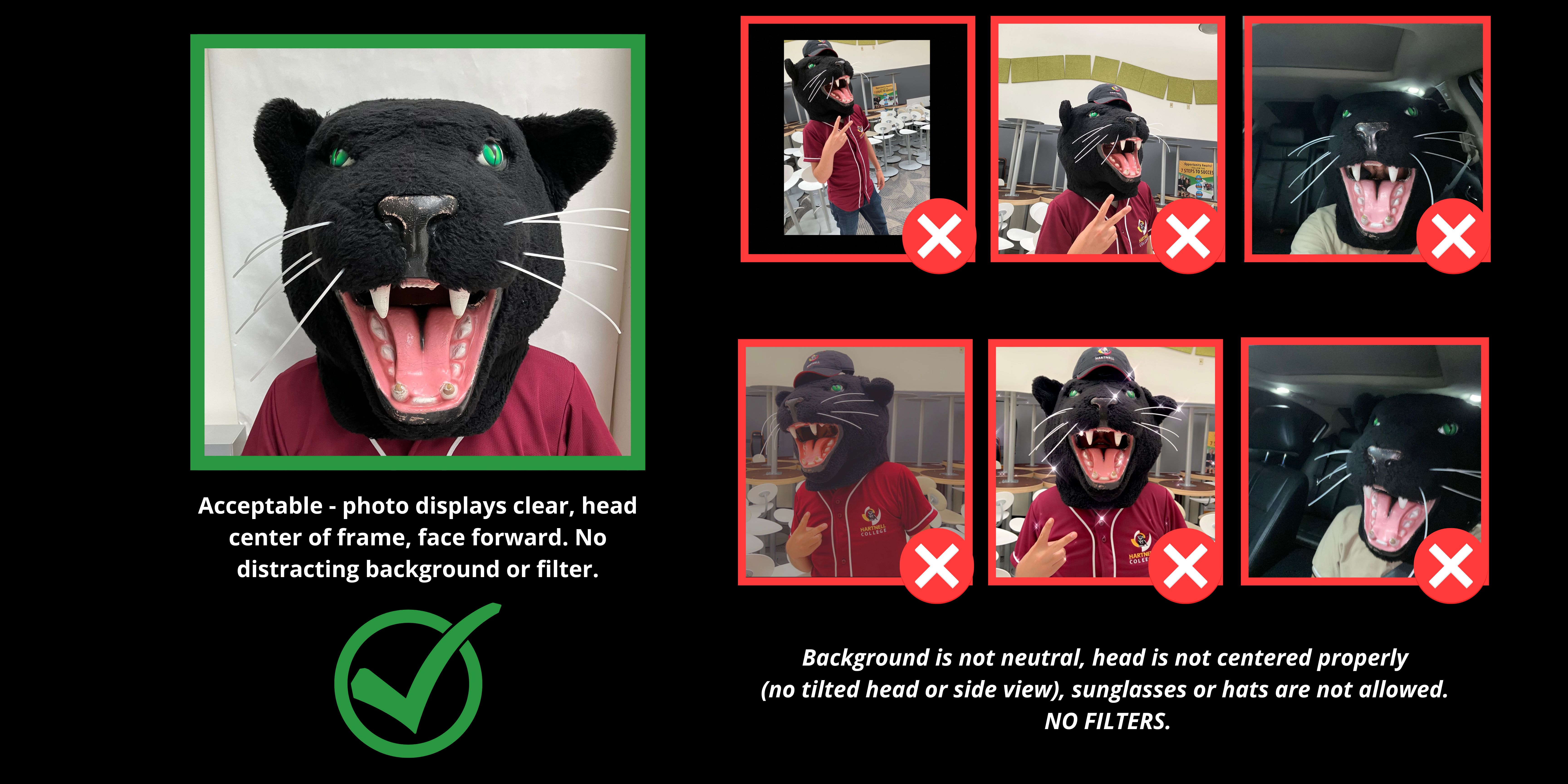
- Photo must display full head from top of hair to bottom of chin
- Center your head within the frame, face forward (no tilted or side view)
- No sunglasses or hats - NO FILTERS
- Use a neutral background - not in car or outdoors
- A GREEN POPUP will appear if your photo was accepted.
- If a RED POPUP appears, the photo was not accepted.
- Allow 48 hours for your photo to transfer to the app.
Once your request is processed and your enrollment is verified, you can pick up your physical CatCard at your selected location.
Main Campus (Salinas): Same Day Pickup
Students can pick up their CatCard at the Office of Student Life, Building C, Room 140, on the same day, provided their photo has been approved and they meet the eligibility requirements.
Education Centers: Monthly Delivery
CatCards requested for education center pickup are printed at the Main Campus and delivered monthly to the following locations:
-
Alisal Education Center: Main Office, Building A
-
Castroville, King City, and Soledad Education Centers: Front Desk
Important Delivery Information: Requests submitted by the 15th of the month will be delivered by the 1st of the following month. Requests submitted after the 15th will be included in the next monthly delivery cycle.
Your CatCard must be updated every semester that you are enrolled at Hartnell College. You do not need to request a new card each semester. Instead, you will receive a current semester validation sticker that confirms your active enrollment.
To receive your updated sticker, simply bring your existing CatCard to one of the following locations:
-
Salinas Main Campus: Office of Student Life, Building C, Room 140
-
Castroville, King City, and Soledad Education Centers: Front Desk
Semester validation stickers are free for currently enrolled students. Be sure to keep your CatCard updated each semester, especially if you use it for MST transportation or other student benefits.
What You Can Use Your CatCard For
Your CatCard can be used for the following:
CatCard Information and Support
Hartnell College is transitioning to physical CatCards for student identification. Digital IDs through the TouchNet 360 app are no longer supported for identification purposes. Students should use their physical CatCard for identification, MST transportation, and other eligible student benefits.
TouchNet 360 may still be used for certain financial services, including accessing existing CatCard funds. Students who previously used a digital CatCard should follow the instructions above to request a physical card.
CatCards are only issued and validated for students currently enrolled at Hartnell College.
-
Students must be enrolled in the current semester and up to date on their Student Activities Fee to receive a CatCard.
-
CatCards must be updated each semester with a current semester validation sticker.
-
Students do not need a new card each semester. Validation stickers are provided free of charge.
Students are responsible for the proper care and use of their CatCard. Please keep the following in mind:
-
Keep your CatCard safe and report lost or stolen cards as soon as possible.
-
Your student ID number is printed on the back of your CatCard.
-
You are responsible for transactions made with your CatCard until it is reported lost or stolen.
-
Hartnell College is not responsible for funds or services accessed through lost or stolen cards.
-
Your CatCard must be presented upon request to authorized Hartnell College personnel.
-
Your CatCard must have a current semester validation sticker to access eligible student services and benefits.
Students with existing CatCard funds may continue to use their remaining balances for eligible purchases and services.
-
Existing Funds: Funds currently on your CatCard will remain available for future use. However, additional funds can no longer be added to CatCards.
-
Current Enrollment: You must be enrolled in the current semester to access your CatCard funds, including balances from previous semesters.
-
Account Issues: If your account displays "Inactive," "Expired," or you are unable to access your funds, contact the Business Office for assistance.
-
Withdrawals and Refunds: Funds cannot be withdrawn directly from your CatCard. For questions about refunds or accidental deposits, contact the Business Office.
Office of Student Life: Physical CatCards
For questions about requesting a physical CatCard, submitting your photo, replacing a lost card, or obtaining a current semester validation sticker, contact:
Hartnell College Business Office: CatCard Funds
For questions about existing balances, financial transactions, refunds, or TouchNet financial services, contact:
The Office of Student Life handles physical CatCard issuance and semester validation stickers. All CatCard financial services and account questions are managed by the Business Office.