Satisfactory Academic Progress (SAP) is the standard by which you are measured to determine if you are making progress towards completing your degree.
If you do not meet SAP standards you may lose your financial aid eligibility. The United States Department of Education requires that financial aid students have their academic progress reviewed each academic year (fall, spring, and summer semesters) to determine if Satisfactory Academic Progress has been achieved.
For more information about SAP, please review our Satisfactory Academic Progress Policy.
If you have a Loss of the CA Promise Grant fee waiver due to Academic/Progress Notice or Dismissal by the college, you can appeal the loss of the award. Please visit the following link for more information.
SAP Appeal Steps
1. Complete the Online Workshop & SAP Quiz.
- All new appeal students are required to complete an Online SAP Workshop. Completion
of this workshop is mandatory.
- If a student begins but does not complete the SAP appeal process for any given semester, the student will need to begin the process over again from Step 1 for the next semester they wish to appeal.
Final Deadline to complete Online Workshop and SAP Quiz for Fall 2026: Friday, November 20 by 5:00 PM
Final Appeal Submission Deadline for Fall 2026: Friday, December 4 by 5:00 PM
Fall 2026 SAP Appeal Deadlines and Process
The Fall 2026 SAP Quiz is now OPEN
2. Check your Hartnell email account for SAP quiz results
- Check your Hartnell email account 3-5 business days after taking the SAP Quiz for quiz results and next steps. If you pass the quiz, you will receive instructions and will be assigned a task to your online Student Forms portal. Students who have not previously submitted online forms through the Student Forms portal will be asked to create an online account before a task can be assigned.
3. Make an appointment with a Hartnell counselor
- Meet with a Hartnell counselor after the semester begins to develop, update or confirm your comprehensive Education Plan (a plan that outlines courses the student must take to complete their educational goal). The major on the Education Plan must match the academic major under the My Progress link on P.A.W.S. Self-Serve.
- If the major is incorrect, you must submit a Program of Study (Major) Change Request Form with the correct major to Admissions and Records and request to have all old majors canceled.
4. Complete and submit the SAP appeal (after meeting with your counselor)
- After meeting with your counselor, you must complete and submit the SAP appeal in your Student Forms account and, if applicable, upload supporting documentation along with your most recent education plan dated during the semester you are appealing.
5. Submit Your Appeals, Education Plan & Supporting Documentation
- Appeals, Education Plan, and supporting documentation must be submitted by the deadline posted on this webpage.
- Incomplete appeals will not be reviewed.
6. Submit your mid-term progress grades, if applicable
- After the first SAP appeal deadline, you will be asked to submit Mid-Term Progress grades with your appeal using your Canvas Gradebook for the SAP Committee to make a decision on your appeal. (Please upload Canvas grades that identify each course name along with current grades. The screenshot must also include the student's name).
Resources
Frequently Asked Questions
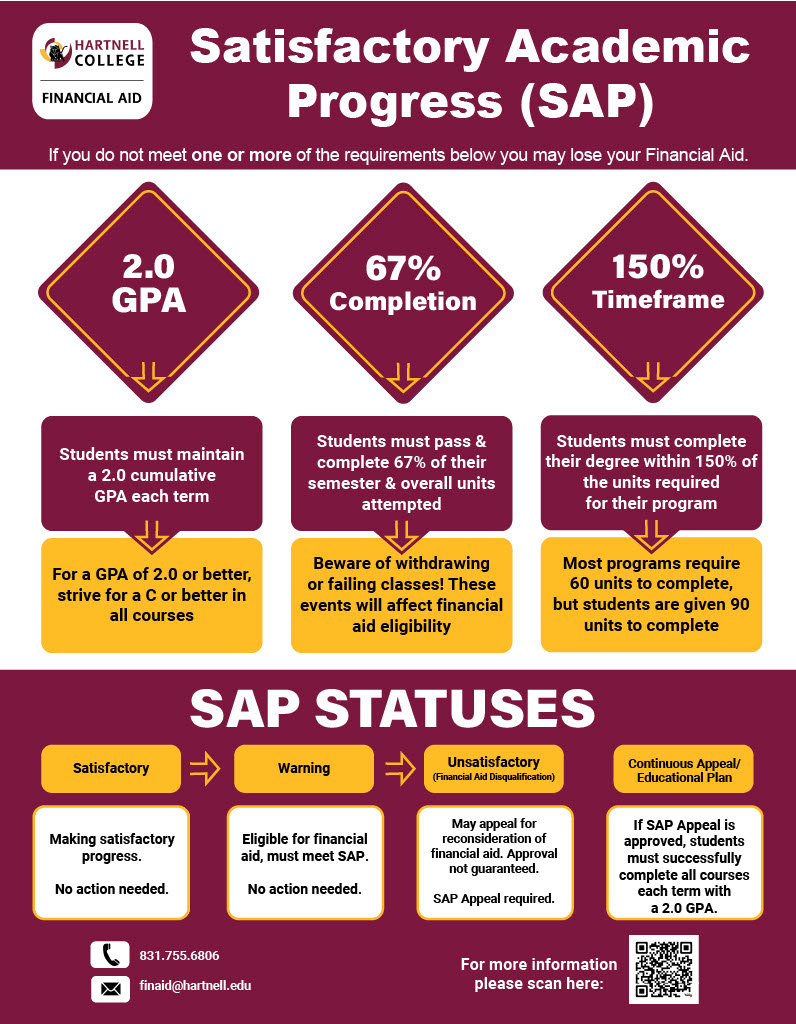
Qualitative and Quantitative Standards measure academic progress. Qualitative Standards measure GPA. All students must have a Cumulative Grade Point Average of 2.0 or better. Quantitative Standards measure completion rates. All students must have completed at least 67% of their cumulative units attempted.
Students who have previously submitted an appeal to the Financial Aid Department and were approved do not need to complete a new appeal as long as they have maintained continuous enrollment. Your SAP record will automatically be reviewed to ensure you successfully completed all courses in which you were enrolled and followed your ed plan.